How We Use Launchpad at Navattic

At Navattic, we drink our own champagne.
We put interactive demos on our website to draw in visitors. We sprinkle demos throughout our knowledge base, blog, and ad campaigns. We create new interactive demos for new feature launches.
As we rolled out Launchpad over the last year, our sales team was the first to test it, to get demos into the hands of their prospects faster and shorten sales cycles.
We could tell you about how Launchpad works (more here if you’re interested), but we figure it’s better to show you how our colleagues use it day in and day out.
Here’s a taste of how Erik Long, Sales and GTM Lead at Navattic, has fully embedded it into his workflow for a more efficient, insight-driven sales process.
How Erik Uses Launchpad to Deflect Unnecessary Demos
Running the same demo every single day, multiple times a day, can get pretty tedious. And it’s especially annoying when those leads aren’t really qualified in the first place.
Launchpad helps Erik and his team avoid that wasted time. “We have a pretty fast sales cycle at Navattic,” he explains.
“But there were definitely times where I gave a demo, and then the prospect said they needed to huddle up and come back with questions. Inevitably, they’d email back a week or two later and say, ‘Hey, we’re excited about the product, but we need one more call with a PM.’”
More often than not, that “one more call” was basically a repeat of the demo he already gave, give or take a few straightforward questions.
Though Erik still shares a Calendly link in case the person absolutely wants to meet, he also jumps into Launchpad and sends a demo tailored to what he thinks the stakeholder is most interested in.
“Typically, that team member will say, ‘This demo is great, I just needed to see the basics of how the tool worked,’ and they move forward with the contract without a call,” saving him that extra 30 minutes.
Compound that across all the leads he’s managing — and that’s a ton of time saved.
Leveraging Launchpad Analytics to Learn What Prospects Are Actually Interested In
“I shoot pretty much every new lead that signs up for Navattic a fairly generalized interactive demo straight from Launchpad,” Erik shares.
Why? Because that demo has Interest Levels built in to capture what features a prospect is drawn to.
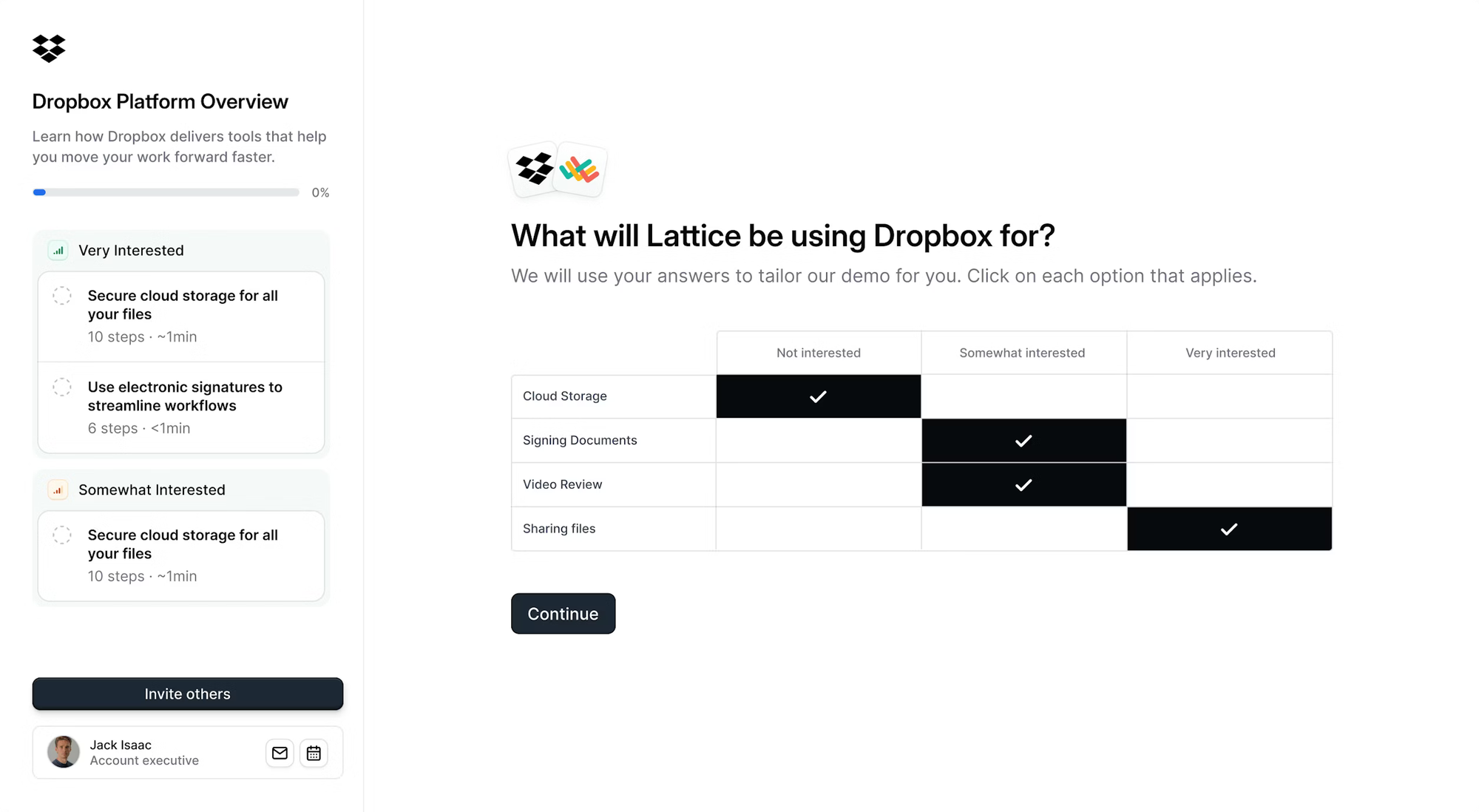
“Not everyone engages with it, but the ones that do will give me a little more intel about what they’re interested in and who they are,” he highlights.
“I can combine that information with my typical account research to nail down an agenda for our call.”
Then, He Uses Launchpad to Add a Personal Touch
Once Erik goes through discovery, he sends what we call a “custom demo” from Launchpad — one he can tailor to showcase the features, workflows, even integrations he might’ve previewed on the call.
“I even have a standard video I like to drop into my custom demo for smaller accounts to welcome them before they click into the demo.
For more strategic, high-value accounts, I’ll record a more personalized video, like ‘Hey so and so, super excited that you’re interested in Navattic, would like to show you a few more things I think will suit your use case.’”
He says that hitting prospects with that human element right away pulls people in and encourages demo engagement.
Championing Sales Enablement Using Launchpad Tools
Erik worked directly with the Navattic product team to get Launchpad to a point where any seller would be ecstatic to use it.
“My feedback from day one building this was that sellers aren’t going to adopt a tool if it’s not ridiculously simple to use,” he notes.
“I’d say we’ve done a really good job of making Launchpad as streamlined as possible, with depth underneath the basics if leadership wants to dive in.”
More specifically, he and other Navattic reps are using Launchpad to:
Send Demos Quickly
Reps shouldn’t have to log into a separate platform every time they want to share a demo. With Launchpad, Erik and his team don’t have to.
“You can just open the Chrome extension wherever you are on the internet. And we have plug-ins for Gmail, Salesforce, Outreach, LinkedIn, too.”
All reps have to do is press a button to activate Launchpad, pick the demo they want to send, and the system automatically populates the prospect’s contact and account information.
“I can literally send what I need to in seconds,” he says.
See Who Else Is in an Account Buying Committee
Before Launchpad, Navattic had an internal library full of interactive demos for sales reps. That was helpful, but only to an extent.
“They were good for education purposes ahead of a sales call or as a follow-up asset. But the tradeoff was that I wouldn’t know who was looking at it. Almost none of them were form-gated,” Erik points out.
With Launchpad, visitors identify themselves by providing their name and email address. And every time someone new views the demo, Erik gets Slack and email alerts.
“I immediately go look them up on LinkedIn and monitor their behavior in the demo so I can reach out in a non-invasive but specific way later,” he says.
He’s found identification to be a particularly useful way to extract information from accounts that he otherwise might not even know to extract.
“In one case, I saw an alert for an internal share and recognized that the person was the CEO, making it more of a high-intent account than I thought,” Erik emphasizes.
“One of the first questions I asked my POC was, ‘Why does your CEO care about interactive demos?’ and it got me to uncover that the CEO was stepping in as head of interim sales because their head of sales was going on mat leave.”
If he didn’t have Launchpad, he wouldn’t have had any context, nor would he have known to ask about it.
Collaborate With Other Teams
Sellers need the right demos in Launchpad — otherwise, they might try to build their own collateral (which can be risky).
When Erik and the sales team need new demo assets, they ask product marketing for help.
Natalie and her team build new demos with proper branding and demo best practices in mind to ensure they stay consistent, no matter who sends them.
Note: You don’t need a ton of content to get started.
“I see a lot of teams get hung up on this. Obviously, more content is better, but even if you just use one demo to start, you’ll collect far more insights from that than you would without using Launchpad at all,” he advises.
Show the Value of Interactive Demos
We all know how hard attribution is. But Launchpad makes it easy. Per Erik:
“The reporting and metrics we have around pipeline impact were aha moments for me, and are aha moments for the prospects I show Launchpad to.
Especially if they’re more of a sales leader. They can see (1) how many prospects are actually looking at demos and (2) the time savings for their team. So if I send a demo, for example, and I don’t need to hop on a call, that shows up in the dashboard.”
Seeing exactly how interactive demos line up with sales ROI (in terms of revenue and productivity) can help you gain more buy-in for interactive demos as a sales tool.
Get Going With Launchpad
“Sales teams are always skeptical of new tools,” Erik notes. “But once I sent my first demo and saw people clicking around in it, I was hooked.”
That excitement is contagious. Once one person starts using Launchpad, it starts to spread — and because it’s easy to learn, adoption happens naturally.
“I see it over and over where reps get really excited the first time they get an email notification telling them who is engaging with their demo. Launchpad is almost like a drug. They can’t get enough of those insights.”
Thinking about shifting to a more data-driven, scalable, and collaboration-focused GTM workflow?
Try a demo of Launchpad yourself or book time with our team to see it live.
Turn demos into deals.
Build interactive product demos that engage buyers and close deals faster.