How SEs Best Replace Video Demos

Product videos may seem like the best way to showcase your product. But they have a fundamental limitation: viewers can’t interact with them.
Without hands-on engagement, prospects struggle to visualize your product slotting into their workflows, let alone communicate its value.
Beyond that, videos can feel a lot like a highlight reel. Too many buyers have been burned by slick videos that don’t actually match a product’s complexity or usability.
Then, there’s the maintenance tax. Every few product updates, you have to assemble a creative team and create a whole new video (or risk having outdated content across your website, blog, and knowledge base).
Interactive demos are an ideal solution to this problem. They:
- Let prospects explore your product without having to log in
- Give you full control over customization
- Are easy to build
- Are easy to update
But if you have a library of product videos, replacing them can feel daunting.
Below, we explain why SEs are making the switch, and share a step-by-step walkthrough of how to transition to interactive demos yourself.
The Limitations of Traditional Video Demos for SEs
An SE’s job, as one Redditor put it, is to:
“Help prospects make the connection between what problem they’re trying to solve, how your product does it, and the value it brings to the business.”
That’s hard to do in a 30-minute call. Which is why companies often produce product videos – with the hope that prospects get at least a little up to speed before they join a live demo.
While that sounds great in theory, videos:
- Don’t always highlight what the prospect cares about, and they can’t opt to look at a different part of the product based on role or interest level like they can with an interactive demo.
- Don’t feel that engaging. It’s easy for people to tune out.
Even videos with built-in personalization have shortcomings. On Reddit, one user points out:
“I’ve been experimenting a lot with personalized video lately. A lot of tools claim to do it, but the second you try to scale past a handful of versions, things break.
[You get] audio mismatches, visuals drifting, inconsistent avatars, weird timing when variables change, videos taking forever to render, or the end result looking like a template that was stretched too far.”
And for SEs who need to give a flawless demo or want a reliable backup when technical issues pop up, videos definitely won’t do the trick.
Clicking through an interactive demo still feels like they’re giving a real demo, showing the prospect what your product truly looks and feels like (even though it’s not the real deal).
Why SEs Are Making the Switch to Interactive Demos
As we’ve already previewed, interactive demos flip the script on traditional product videos, letting prospects click through a live simulation of your product to:
- Explore one or more features
- Test integrations and workflows
- Get a genuine feel for the interface
All without having to sign up for a free trial or freemium account.
SEs can send interactive demos ahead of a call or send them as a follow-up to a live demo, reminding prospects of all the ways your product addresses their unique pain points.
Even better, SEs can use interactive demos on a call to avoid spinning up new demo instances and the possible bugs that come with them.
Step-by-Step Workflow to Transition from Video to Interactive Demos
Some interactive demo platforms, like Navattic, make it really simple to turn videos into interactive demos.
Whenever you’re ready to create a demo:
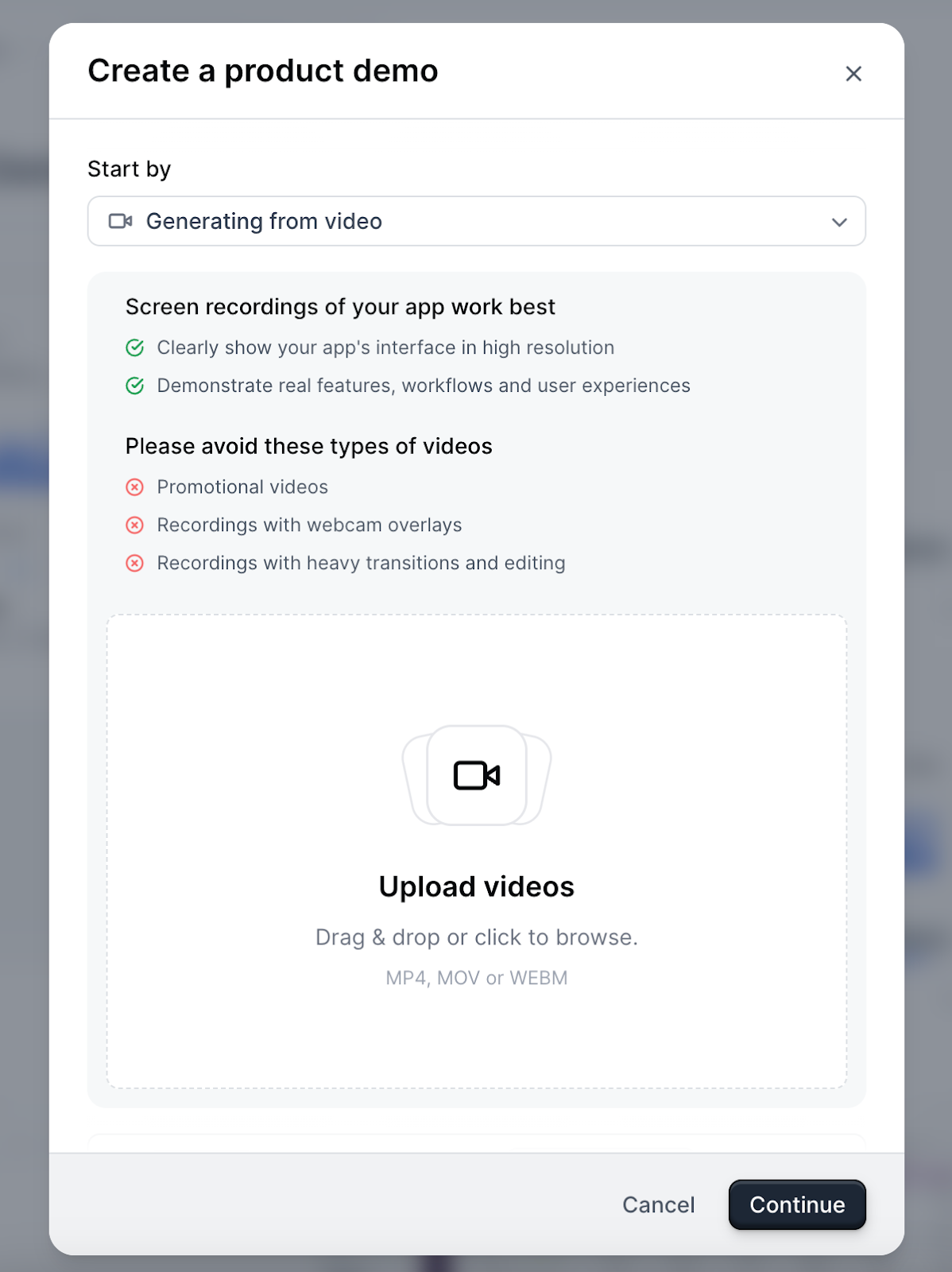
- Select “Generating from video” in the Start by dropdown.
- Upload your video in MP4, MOV, or WEBM format.
- Click Continue.
- Navattic then uses the product screens in the video to create a first draft of your demo for you.
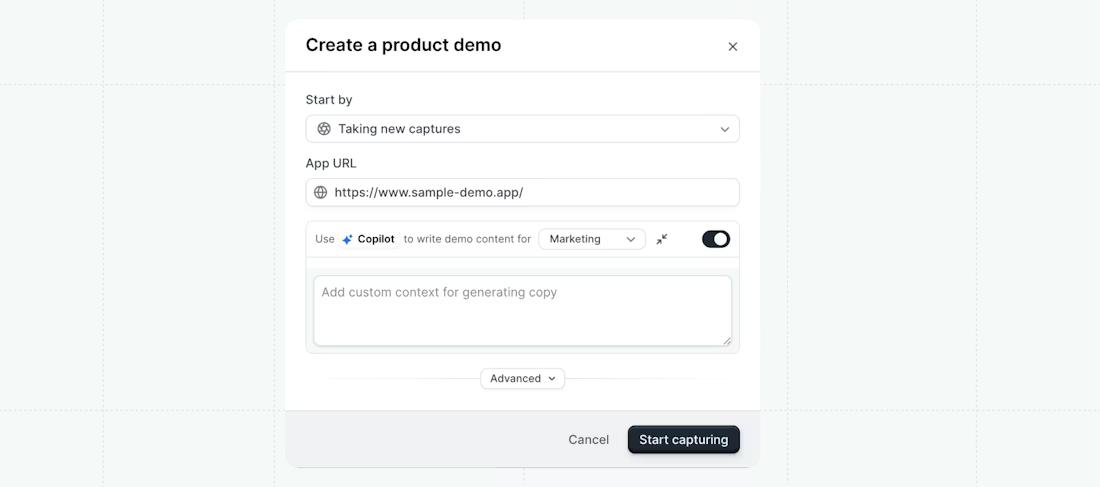
If you’d rather start building a demo from scratch, you could try using our AI Copilot, built on best practices from 30,000+ demos created on Navattic.
- Enable Copilot while you’re taking Captures. That way, Copilot will automatically capture the product information for your demo story based on where you click.
- Tell Copilot: (a) What use case you’re creating the demo for (marketing, sales, customer success, or product). (b) To adapt the demo to a specific target audience, strike a certain tone, or use specific messaging with a short prompt.
- Wait for Copilot to generate appropriate content for each step.
- Make edits to step names, content, CTAs, and more in natural language using Copilot Prompt.
Cost and Efficiency Benefits of Moving Beyond Video Demos
It’s hard to provide an average cost to produce a product video because it depends on who you’re working with, what you’re featuring in the video (real product footage, animations, etc.), and how long it’ll be.
But we rounded up some estimates:
- “I am nearly contracted with a company that is a friend of my CMO for ~$20k USD, which includes one 120-second video and 90-second video. This price includes scripting, storyboarding, general ideation, production, original animation, voiceover, music, etc.” (r/marketing)
- “Pro editors ask about 1,000 USD per minute of video (sometimes more).” (r/SaaS)
- “On average, a simple live-action video might start at around $1,500 and go up from there. However, for high-quality production and professional actors, costs can exceed $10,000.” (ContentBeta)
Needless to say, video is expensive.
And if you need to create more than one a year (which is probably necessary if you make any product updates), you’re looking at putting a heavy dent in your marketing budget.
For less than $500 a month, you can create unlimited HTML demos with our AI Copilot.
You can add checklists to let users choose what they want to see, add a custom theme to match your branding, and edit your demos whenever you need to make updates.
Our Starter Plus plan even includes Slack integration and webhooks, so you can make it even easier to share demos and see when prospects and customers interact with them.
Even our most expensive annual plan (besides enterprise pricing) is about the same or less than you’d pay for a professional video.
$12,000 a year gets you:
- 10 seats
- Unlimited HTML demos
- Copilot
- Launchpad lets you build interest level demos, sandbox demos, email and Slack alerts, and even add personal intro videos to your demos
That’s not even counting all the time SEs save by not providing input on videos – and just making custom demos themselves instead.
Overcoming Common Challenges When Replacing Video Demos
SEs are some of the busiest people at your company.
Asking them to change their process – even if it saves time and money in the long run – can be difficult.
Here are some challenges you might face, and how to get past them:
Challenge 1: Learning a New Tool
Most interactive demo tools are no-code and are designed to be super intuitive (especially for SEs who are intimately familiar with software).
So show them how easy it is to turn your most-used video into an interactive demo. Most SEs will build their first one in under an hour (and the second will come even faster).
Once they see how easy it is to personalize and share demos without wrestling with video files, their resistance will start to fade.
We’ve seen it happen with our team.
“Sales and SE teams are always skeptical of new tools,” Erik notes. “But once I sent my first demo and saw people clicking around in it, I was hooked.”
Challenge 2: Managing a Demo Library
A well-organized workspace helps keep everything consistent and easy to find. And that’s really important as your team starts creating more demos.
With tools like Navattic’s Launchpad, SEs can build a library of demos for their sales team to choose from.
They can mix and match demos depending on what the prospect, account, or vertical cares about most.
And they can combine it into a single personalized demo link (unlike videos, where you have to send multiple links for each video).
Challenge 3: Measuring ROI
We all know attribution is tough. But Navattic makes it really easy to see:
- Who on your team is sending interactive demos (from Launchpad Rep Activity)
- Which leads are engaging with those demos (from Analytics)
- And which of those leads convert into deals (from your CRM integration)
Real-Life Case Studies from SE-Led Interactive Demo Adoption
SEs and GTM teams are already replacing their video libraries with interactive demos. Here are just two examples at leading B2B SaaS companies:
Versapay
Versapay, a cloud-based accounts receivable (AR) automation platform, uses interactive demos to eliminate painful, repetitive presentations and educate its audience before sales calls.
Shanyn doCarmo, one of Versapay’s Senior Sales Engineers, emphasizes:
“Executives don’t want to get on a call to see our software demo. And nobody wants to sit and watch a recording. So we send an interactive demo that their team can walk through on their own.”
Her team also uses interactive demos during live presentations:
- Presenter mode, which hides instructional elements
- Guided navigation with beacons that show exactly where to click
- Speaker notes that provide contextual prompts for SEs
With these features, Shanyn can “pull presentations together in two hours instead of two days, and our AEs can confidently demo without getting lost in the product.”
“It’s completely changed the way we present," she says.
JumpCloud
JumpCloud, a cloud-based directory platform for IT teams, wanted to move from videos to a full suite of “simulations” to support prospect education.
Per Nikki Stubbs, enablement team lead at JumpCloud:
“If it's a straightforward process, perhaps a 5-10 or 10-20 step process (and can be explained quickly), then an interactive demo is often the better choice over videos.”
Working with her teammate, Tyler Worley, a senior instructional designer, they created roughly 30 demos to save SEs and AEs a ton of time during discovery calls: prospects would already come in with foundational product knowledge.
“With Navattic, it’s super simple to capture screens. You hit the button, then it’s done,” Tyler notes.
Besides allowing potential users to experience features without needing to sign up for JumpCloud, interactive demos have also:
- Ensured brand and content consistency with prebuilt templates
- Reduced overlapping edits in multiple projects
- Prevented rework (before, accessing other employees’ work was impossible, leading to a lot of redoing)